Godsungbee
An app for finding shops and items worth your money. A price map filled by neighbors’ tips, plus card and online-mall hot deals and walking points. Shipped in four months by a team of three: planner, designer, developer.
godsungbee.comImpact
- Shipped the web and app (v1.0.0) in four months with a planner and a developer. Owned UX and UI design throughout, and led the product end to end, including front-end publishing done with AI.
- Tied the whole UI to one criterion, value for money: price pins, running savings, and a thumbs vote on value.
- Designed a report → approve → points loop plus walking points, so the map grows without the team filling it in.
- Built the admin console ourselves, covering report review, members, points and abuse reports, so three people can run the service after launch.
Role
Product Designer & Product Lead (UX · UI · Front-end publishing)
Timeline
Jul – Oct 2026 (4 Months)
Team
1 Planner · 1 Designer · 1 Developer
Tools
Figma · FigJam · React · Claude Code
Contribution
On a team of three I owned UX and UI and led the product overall: framing the problem with the planner, and publishing the designs to the front end myself with AI so the developer could focus on features.
- Competitor analysis, IA and core flow design
- UI for map, deals, steps, reporting and the ops screens
- Defining core interactions such as price pins, savings and the value vote
- Front-end publishing with AI, and leading product scope and priorities through launch
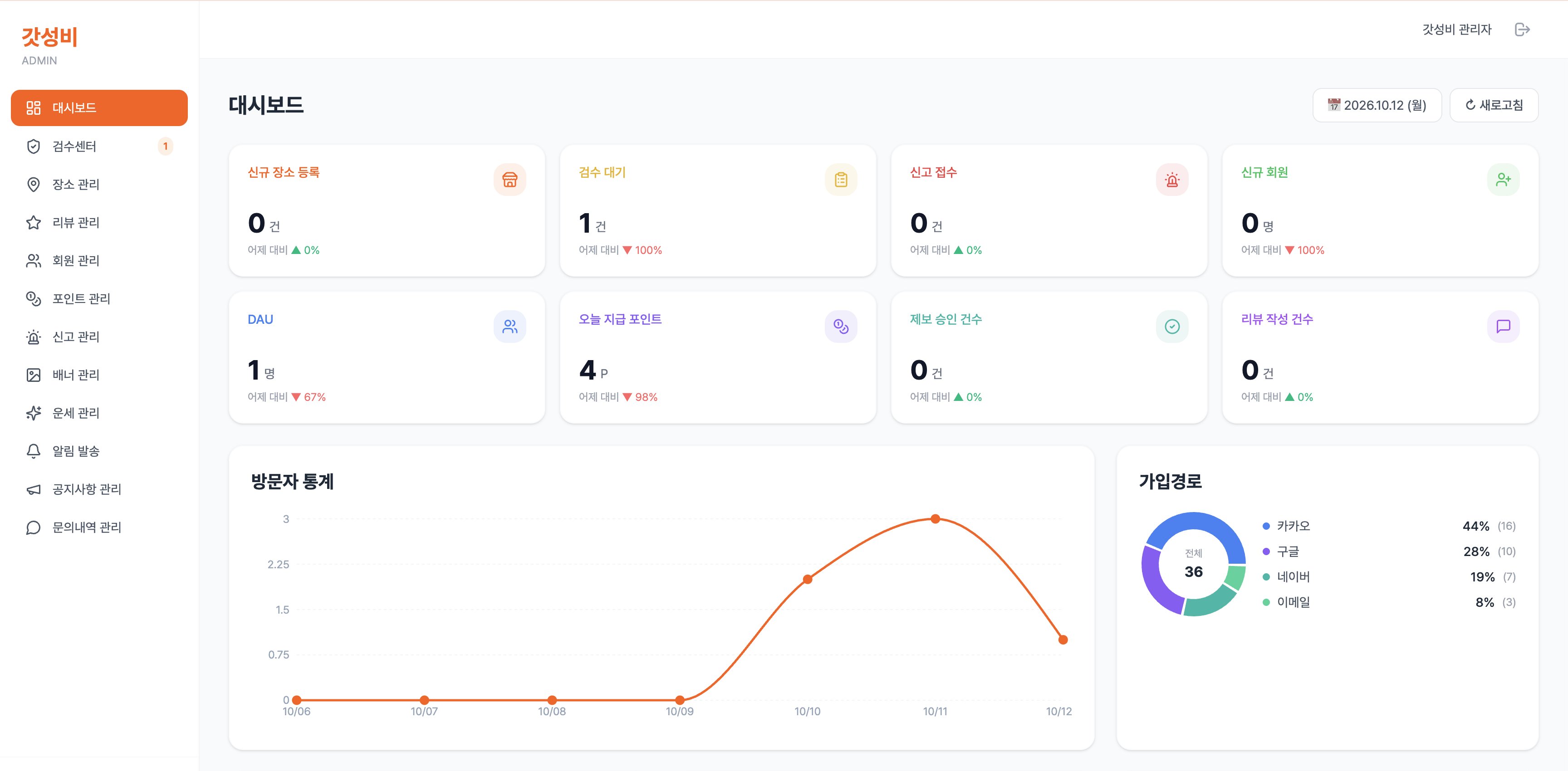
- Designing and publishing the admin dashboard, review center and member, point and report management screens
01
Overview
Same money, spent smarter.
As prices rise, “where does the same money go further?” has become an everyday question, for restaurants, household goods and gadgets alike. But that knowledge is scattered across word of mouth and community posts, and map reviews are hard to trust once ads enter the mix. Godsungbee pairs a map of good-value shops, filled by neighbors’ tips and reviews, with card and online-mall hot deals, so the shops and items worth your money are in one place.
Problem
- 01“Good-value spots” live mostly in word of mouth and scattered community posts.
- 02Portal map reviews mix in ads and sponsored posts, so value is hard to judge.
- 03Card and online-mall discounts live in separate places with no single view.
- 04With no way to compare where money goes further, people end up spending the way they always have.
Who it’s for
Value-minded spender · Jihoon (29)
Three years into living alone, he eats lunch out and buys household goods and small gadgets online. He wants choices that feel worth the money rather than expensive ones, but map reviews read like ads and deals are scattered across card apps and forums, so he spends the way he always has.
02
Desk Research
With dining costs climbing, value for money has moved from a search keyword to a purchase criterion. Yet existing channels sort by taste and popularity, offering no axis for judging value. That is where the opportunity was.
- Naver / Kakao Map reviews
- Ads and sponsorships dilute trust in value for money
- Delivery app reviews
- Delivery-centric, so it doesn’t reflect dine-in value
- Local communities & SNS
- Scattered as posts; no way to compare location or price
03
Key Design Decisions
- 01
Pins show the price, not the name
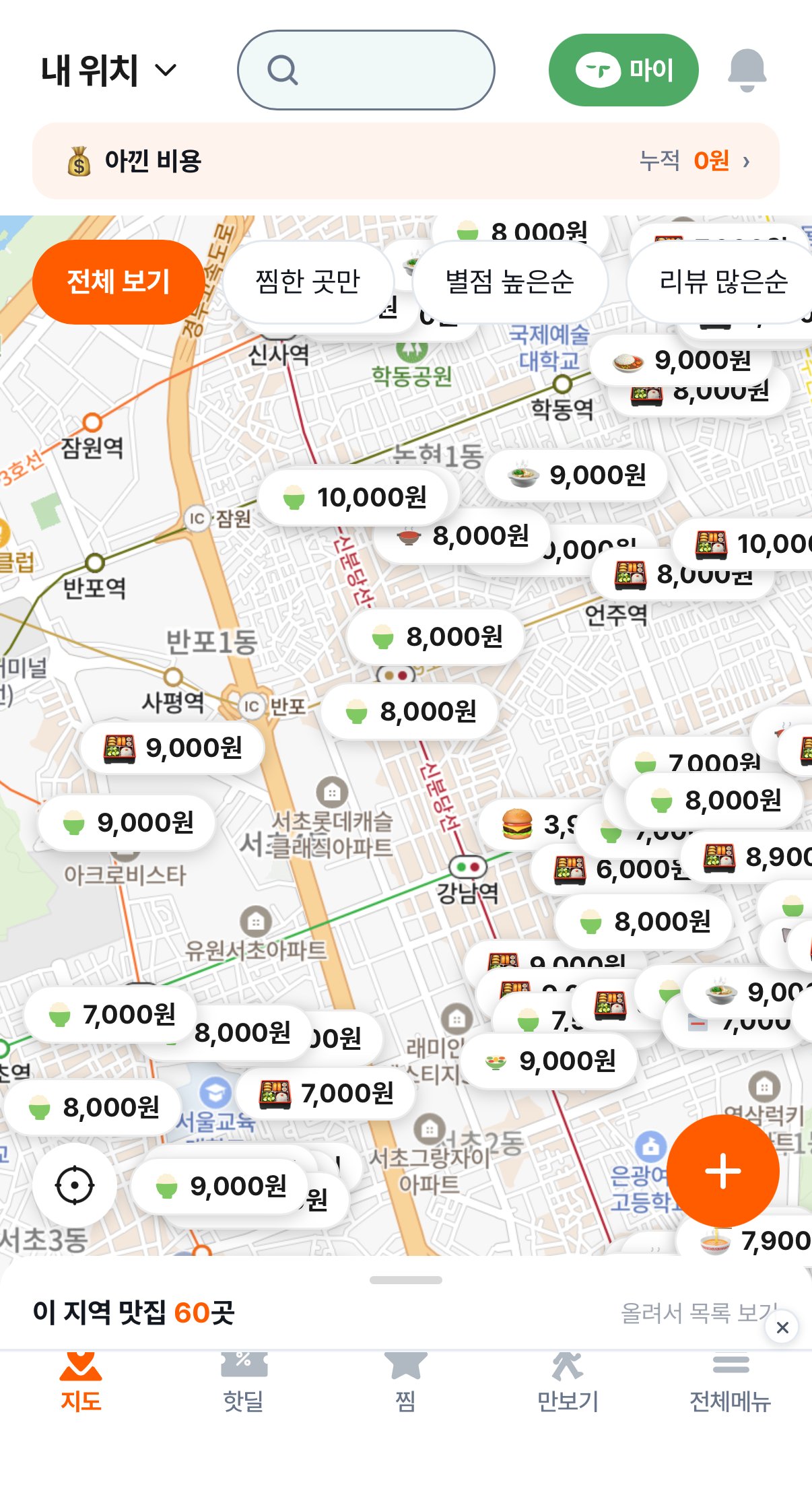
Every pin on the map reads like “₩8,000”, the price of a signature dish, instead of a shop name. You can read a neighborhood’s price range by scanning the map without opening anything. Deciding that a value app’s first screen must be price drove the rest of the UI.
- 02
Savings add up on screen
A persistent bar above the map shows “Saved · ₩0 total”. Value for money is hard to feel, so the app keeps a running number of what you have saved to give a reason to come back.
- 03
Walking earns points
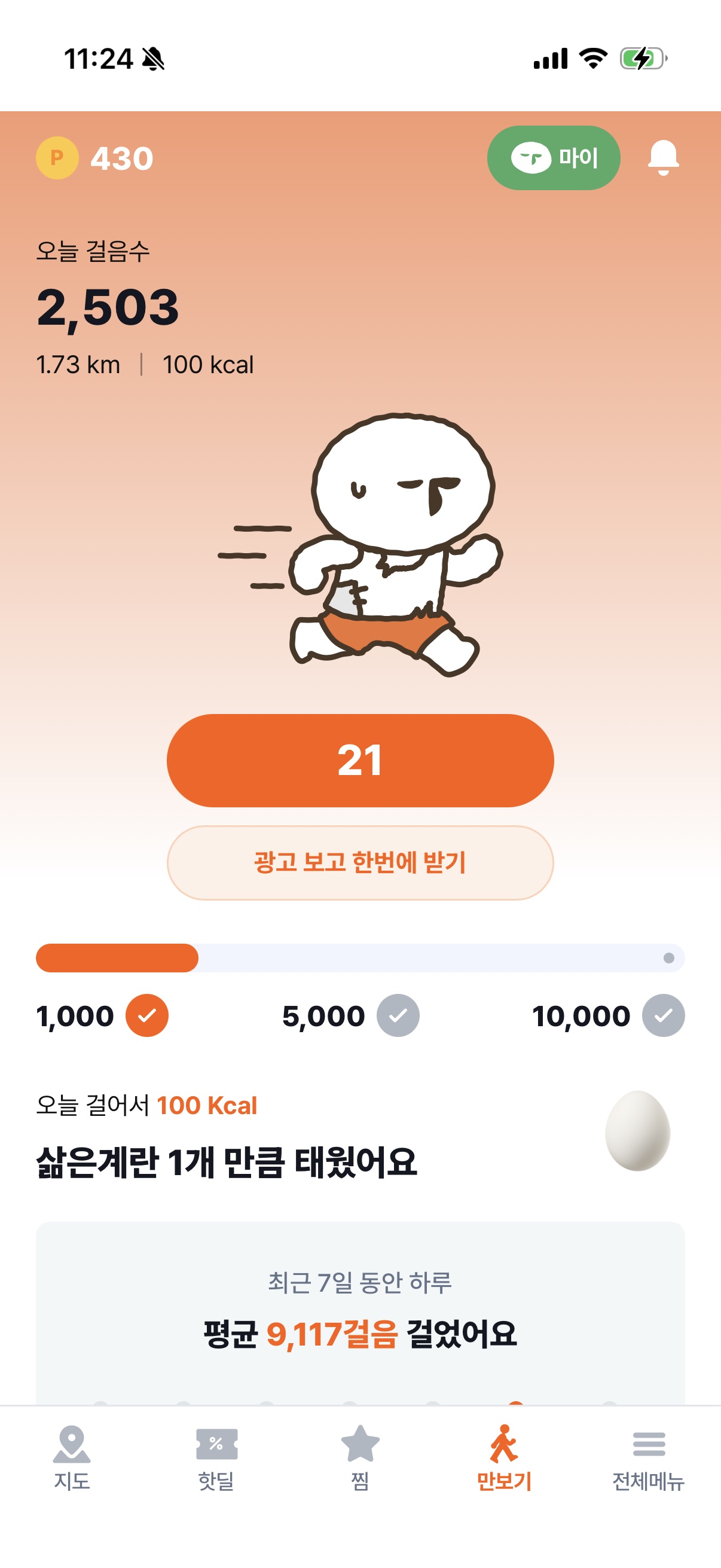
A step counter sits in the main tab bar and pays out points for walking. Even early on, when your neighborhood has few tips yet, there is a reason to open the app daily, and those points feed back into tips and reviews.
- 04
Ratings are a thumbs vote, not stars
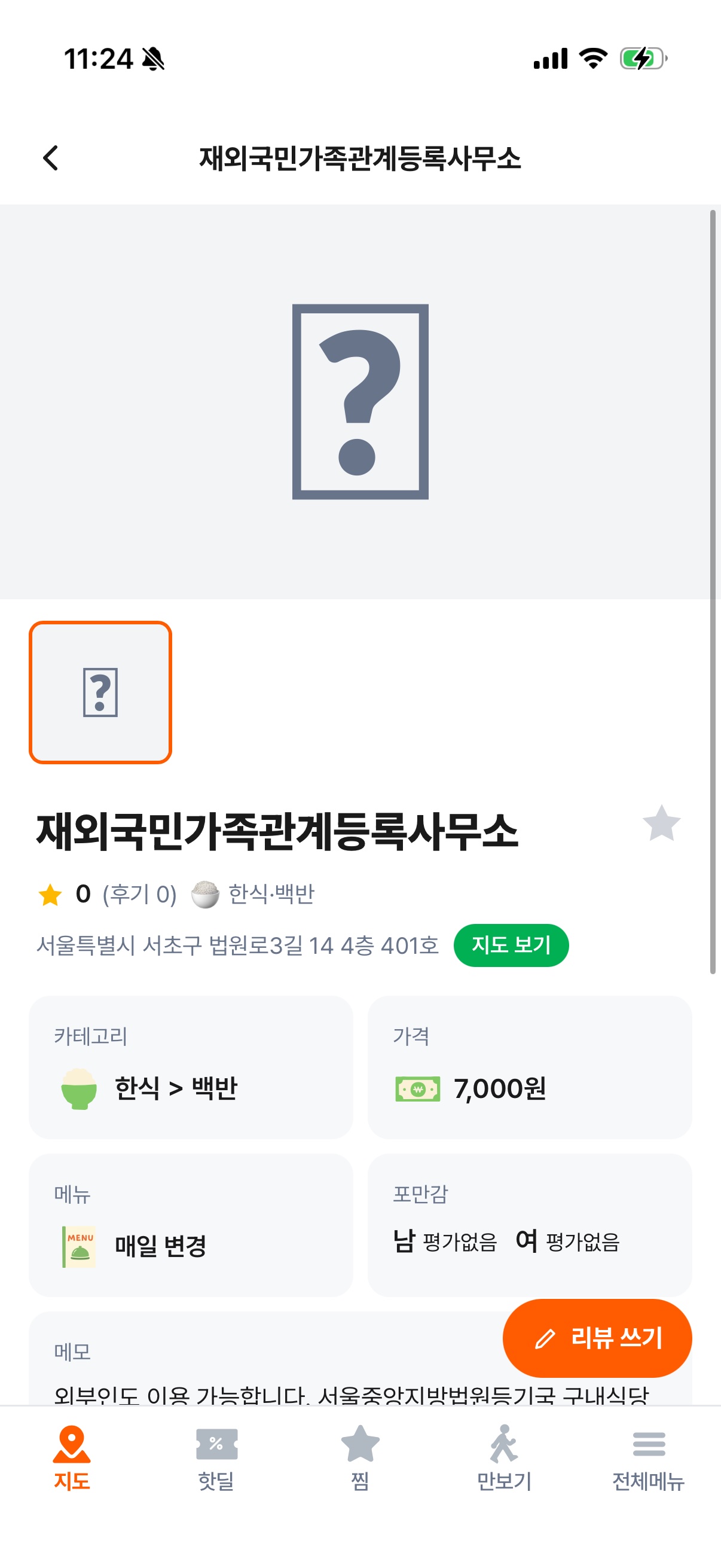
Each shop takes a live thumbs-up / thumbs-down vote on whether it is good value. Stars blend taste, mood and service, but this app asks one question: was it worth the price?
04
Information Architecture
Five bottom tabs. The + in the middle is Report, the action the app wants most, placed where it is easiest to reach.
- Map
- Price-pin map with filters: saved only, rating, reviews, today’s deals, food category
- Hot deals
- Card and online-mall discounts by category: food, household, beauty, digital
- +
- Report a shop or deal; points on approval
- Steps
- Points for steps walked
- More
- Saved, ranking, menu roulette and worldcup, my page, notices, inquiries
05
A Map Built Together, Run by Us
The team doesn’t fill the map. Reports come in, an operator checks them, points go back out, and visitors vote. That loop grows the map.
- 01A resident reports a shop or deal with its price, category and address.
- 02The report enters a pending state and is approved or rejected from the ops screen, with a reason.
- 03On approval a pin appears and the reporter earns points; false reports cost points.
- 04Visitors vote and review, and the pin’s credibility accumulates.
We built the admin console too
For the loop to run, someone has to review reports, hand out points and handle abuse reports every day. Rather than patching it together with outside tools, we built the admin console ourselves. The dashboard shows new places, pending reviews, abuse reports, new members, DAU and points paid out each day; the review center approves or rejects reports; and members, points, reports, banners, notifications, notices and inquiries are all managed in one place.
06
Screens
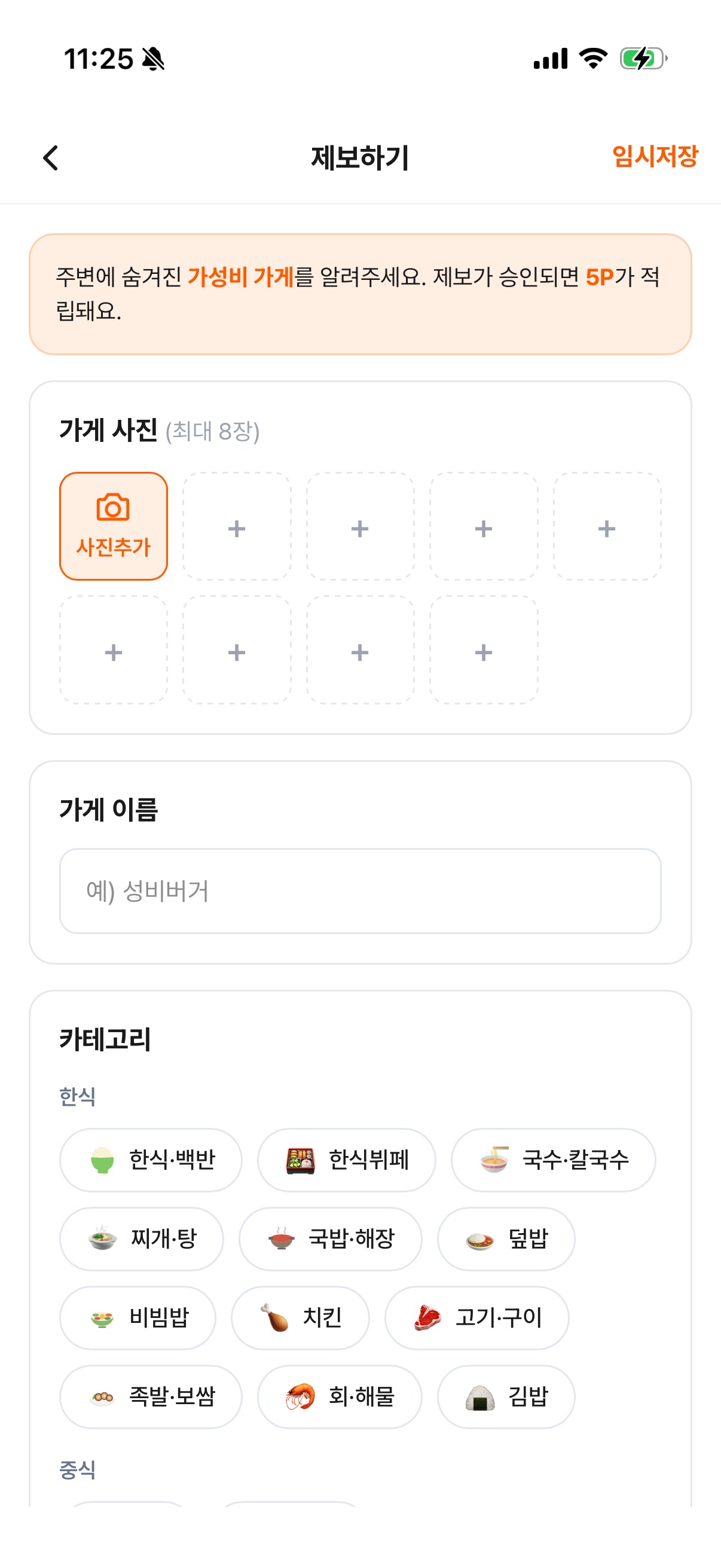
Captured on a real device, October 2026.
07
Results
Started in July 2026 and shipped as v1.0.0 at godsungbee.com on October 1. Web and app run from one codebase, and the product keeps improving on real users’ reports and feedback.
- Platforms
- Web · iOS · Android (Capacitor)
- Hosting
- Cloudflare Pages
- Sign-in
- Google · Naver · Kakao
08
Lesson Learned
- 01
An information service comes down to who fills it in first. An empty map brings no one back, so we designed reasons to open the app before the content exists: tip rewards and walking points.
- 02
Shipping in four months as a team of three meant agreeing on rules before screens. The parts users never see, approving or rejecting reports with a reason and the rules for granting and deducting points, decide how much the map can be trusted.